
Settings Manager by Aztec Media Inc. uninstall
The Settings Manager to Adware, the with the search engines-the Adware "Default Search" works. Where exactly is the purpose of the Settings Manager is, it is rather unclear. For this reason alone, you should remove the Adware.
- Open the control panel and select "programs" and "uninstall a program".
- You can now sort the list of installed programs after the installation date.
- Select the "Settings Manager" and "Linkey" and click on the Button "Uninstall".
- You can also remove all the unknown new entrants. Google the programs in case of doubt, before you remove them.

Settings Manager and Default Search
Add-On from the remove Settings Manager
You will still notice an impact from the Setting Manager in your Browser, you need to remove the Add-On manually. Perform the following instructions for all installed Browser.
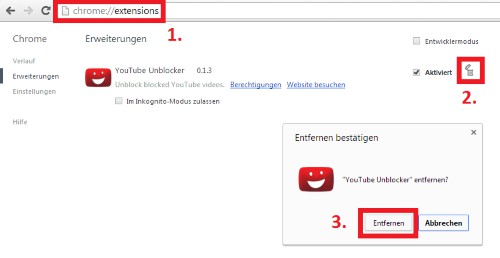
Chrome: Add-Ons delete
In the next practical tip we show you how to individual files online for virus check.




