
Instructions: Search Terms uninstall
The Spyware "Search Terms" is mostly about installing free Software on your Computer. The Tool collects a variety of personal data on your Computer - what these are then disposed of, however, is unclear.
- Open the control panel and select the option "programs" from.
- Here, search for the entry "Search Terms" and select it with the mouse.
- Click on the Button "Uninstall" and follow the instructions.

Search Terms remove
Search Terms from Windows remove
Thus, the last Remnants of the Adware will disappear, must still be a couple of clicks, done.
- AdwCleaner: The Tool is completely free and requires no Installation. Start AdwCleaner, run the short Scan and then remove all of the finds.
- Malwarebytes Anti-Malware: do you Want to be on the safe side, or Search Terms are still not removed successfully, it helps to have a virus Scanner. This program is free and is extremely reliable.

MBAM: Search Terms remove
Search Terms: Browser-check links
- Also in the links in your Browser may be hiding the Spyware. Malicious Code can change the settings of the browser easily.
- For this reason, you should also have the Browser shortcuts clean up. The process takes only a few seconds.
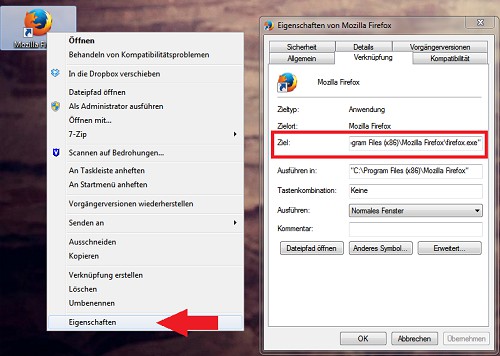
Browser-check links
In the next practical tip we show you how to individual files online for virus check.





