
Windows 8.1 change password - how to
- Proceed with the mouse to the bottom right corner of your screen and click in the Flyout menu, click settings.
- Click on "change PC settings".
- Under "users" you will see your Account information. At the sign-in options, you will find the Button "change password". Here you can set the new password.
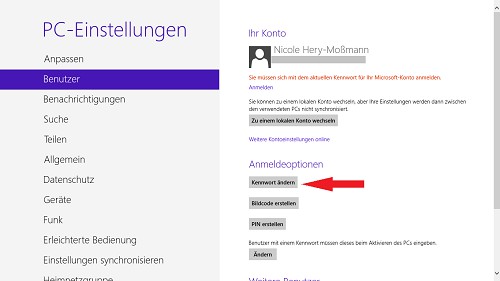
Here you can change your Windows password
Windows-change password if the PC is joined to a domain
Your PC belongs to a domain, the administration of passwords and the frequency of the Change mostly in the hands of the System administrator. In this case, as follows:
- Press the key combination "CTRL+ALT+DEL".
- Now you can see under the point "change password". This Option is available only if your PC is part of a domain. Click on it and follow the instructions.
Is your password when logging in from Windows 8.1, as incorrectly rejected, you will learn, in a further practical tipon what to do can.





