
Managing user accounts in Windows 8
Multiple users working on a PC, everyone should have their own user account. So private files can be protected from the access of other users:
- Proceed with the mouse to the lower right corner of the screen.
- In the Flyout menu, click on "settings" and then on "change PC settings". On the following pages, you must specify your E-Mail address, password, and account type.
- In the right menu, select "user" and scroll down to the item "Additional user".
- With the Button "add user" to create a new user account.
- On the following pages, you must specify your E-Mail address, password, and account type.
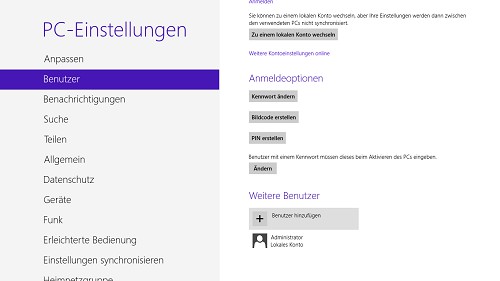
Create new user account
To the new user account later far-reaching rights, you also need in Windows 8.1, the Administrator has to change.





