
Lan connection preferred use
Laptops with built-in Wi-Fi module to select themselves into the stored wireless network. If, however, a LAN connection, you should prefer this. How you prioritize each of the Links, read here:
- click in the control panel, click "network and Internet" and then click "network and sharing center".
- Follow the Link "change adapter settings" and Vista/Windows 7 the Link "manage network connections".
- The description of the individual Connections to which network and which network card it is. For example, if multiple LAN Connections for private and business network are established to find out the correct connection. Not used in the networks are marked with a red cross.
- Now, press the [Alt] button to display the shortcut menu and select the command "Advanced | Advanced settings".
- In the tab "adapters and bindings" lists all the established network connections in the order in which the System is accessing it. It is, therefore, always uses the first available connection and not the fastest.
- Now select the "LAN connection" and move it with the arrow symbols at the top Position. If necessary, change the order of the other Compounds and confirm the Dialog click on "OK".
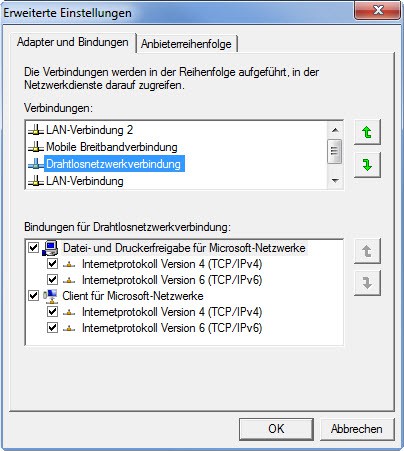
Network connection prioritize
How to make your wireless configuration to a USB Stick back up, read this practical advice.





