Names and their importance in power amplifiers
In the case of most amplifiers, you can make four important settings. These have no standard names. The most common designations and their meaning are explained in the following. How you have your speaker system set up we will show you in an extra-practical tip.
- Gain The "Gain" or "Input Gain" is the gain of each individual input signal. "Level" or "Volume" referred to, however, most of the volume with which all the input signals to the loudspeaker are passed.
- Crossover: The crossover is also referred to as a "Crossover". It is usually the crossover frequency between tweeter and woofer. In some amplifiers, you can pass instead of a crossover and a high - and a low-pass to regulate, make then soft, together with the frequency.
- Q factor: The Q-factor describes the steepness of a Filter, so basically: "how many decibels per octave the effect of the Filters drops?". In a crossover, the value says how wide the frequency range is reproduced by two speakers at the same time. The lower the Q factor, the wider the range. The Equalizer, the Q-factor indicates how wide the spectral range is amplified or attenuated.
- EQ: The Equalizer, also called "EQ" is a Filter that you amplify certain frequency ranges, or can weaken. The goal is to make the volume over the entire audible spectrum, "equal", i.e. equal to,. Most of the time you can adjust the lower frequencies "Deep"/"Low"/"Sub"/"Bass" and the higher frequencies to "heights"/"Treble"/"Tweet". Sometimes the medium frequency range, "Mid", you can also increase or decrease.
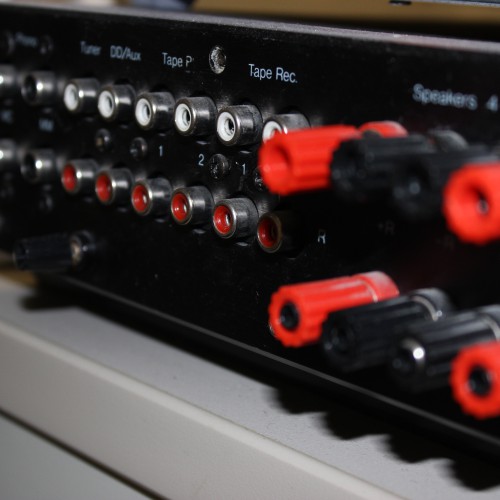
A classic power amp
The optimal settings for your amplifier
Depending on the setting options of your amplifier, as well as the size and quality of your speakers and acoustic conditions of your room, you should make the following settings for the optimal listening experience. For more tips and hints are in the following photo gallery documented. Make fine adjustments according to your personal Feel.
- Gain I: always Start with a neutral Gain. Only if you notice in the case of several connected devices annoying volume differences, to regulate them. Before you turn the Gain down, check to see if you can reduce the connected playback device volume.
- Gain II: Equipment, such as turntables, electric guitars and microphones have a low output voltage that must be amplified by a high Gain. You have a battery-powered device, such as an MP3 Player, you can not save battery power, you turn on the Player, so according to the turn and instead of the Gain Knob.
- Gain III: Avoid extremes: A high Gain generated in the non-linear distortions, i.e., frequencies that do not occur in the original Signal at all. In the entire chain, from the playback device via the power amplifier, possibly up to the active speakers, should the Gain and Volume not maxed out.
- Crossover I: Set the Subwoofer channel to "low-pass" "Low Pass", "TP" or "LP". Broadband speaker set to "Full" or "All" if you have no Subwoofer. Otherwise, the "high-pass", "High Pass" or "HP".
- Crossover II: The optimal crossover frequency between the Subwoofer and the wide-band speakers strongly depends on the bandwidth of your broadband-speaker. Do you have boxes of very small speakers, you should turn the frequency is very high. With larger speakers, a value of 80 Hz is optimal. A crossover between medium - or wide-band speakers and tweeters is more in the range of 1.8 kHz. You can set the low pass of the Subwoofer and the high pass of the wide-band loudspeaker can be individually adjusted, start here first with the same frequency.
- Crossover III: For fine adjustment of your crossover, you can get a Sweep, like in this Youtube Video, using. You should not hear any sudden amplitude jumps, or other "strange" effects (phase cancellation due to Superposition of the signals from the Deep - and wide-band speakers).
- Q-factor I: Have crossovers with a high Q-factor, almost any frequency from either the Subwoofer or from the broad-band speaker. Not of the two. The advantage of this is that less phase error cancellation, as the comb filter effect known. In many listening tests, however, crossovers with a low Q cut-factor better than those with a very sudden separation. To a factor of phase shifts in Filters with high Q. On the other, a sudden separation can be heard as "jump", since the speakers are in different positions. Ask, if possible, the Q-factor for the frequency of a crossover to a low value.
- Q-factor II: The Equalizer with a low Q-factor means a wider frequency range, the attenuating may increase. "Blaring" your Subwoofer in each of the Melody notes in the Bass, you can eliminate with a high Q-factor of the resonance, possibly.
- EQ: Start with a neutral EQ. Your speakers are in a room with a thick carpet, heavy curtains and a bulging bookcase, turn up the treble a little louder. In tiled rooms tend to be quieter. In very small spaces, you may want to tone down the Bass. We devote a whole practice to tip the theme of "Equalizer adjust".
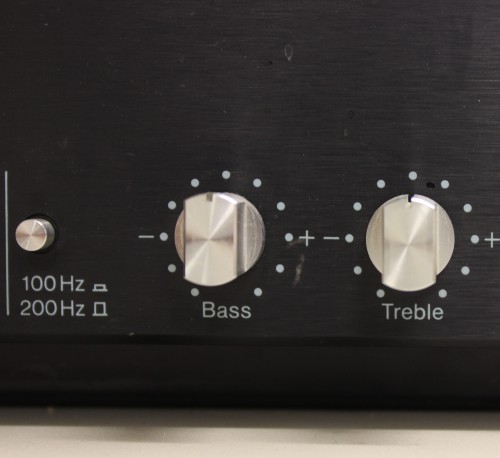
Typical Control of a power amplifier
In addition, CHIP-Online-practice tips we will explain to you how your AV Receiver set and give you tips regarding the speaker connections and the cross section of loudspeaker cables.
Latest Videos
The death switch: to be able to the world and used to be sold, many power amps, both with the European than with the American/Japanese mains voltage. Here you set the wrong mains voltage, you can go to your amplifier suddenly broken.
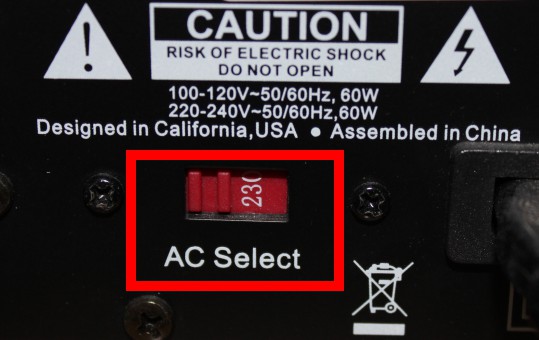
The death switch: to be able to the world and used to be sold, many power amps, both with the European than with the American/Japanese mains voltage. Here you set the wrong mains voltage, you can go to your amplifier suddenly broken.