
Windows 10: Here, you can find the Firewall settings
- Open the control panel. You can find this in the Start menu.
- If you select the category "System and security", find the "Windows Firewall".
- All required settings can be found on the left hand side.
Firewall feature in Windows 10, open
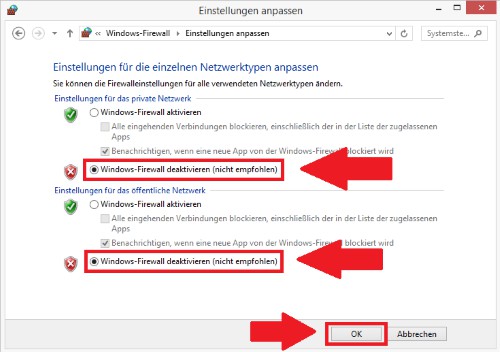
Firewall settings on Windows 8
- You lead the mouse to the right edge of the screen and click "Search". Enter "control panel" and select the same-named App.
- Click in control panel on the top left of the "System and security".
- Here you will find the "Windows Firewall".
Windows 8: disable the Firewall
Firewall in Windows 7, configuring
- Click on the Start Button.
- Select on the right side of the item "system control".
- Click here above on "System and security".
- There you will find as the second item is the "Windows Firewall".
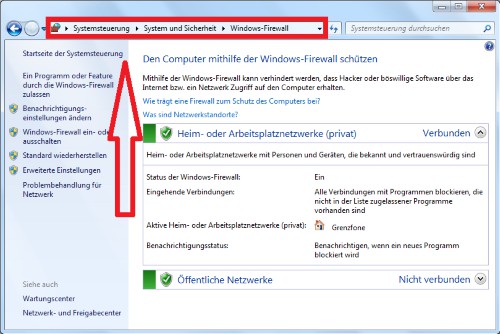
Firewall in Windows 7
Firewall in Windows XP, find
- Click the bottom left of the screen on "Start" and on the right, select the "control panel".
- Click on the left to "switch To classic view".
- You scroll down, you will find as the last item on the "Windows Firewall"
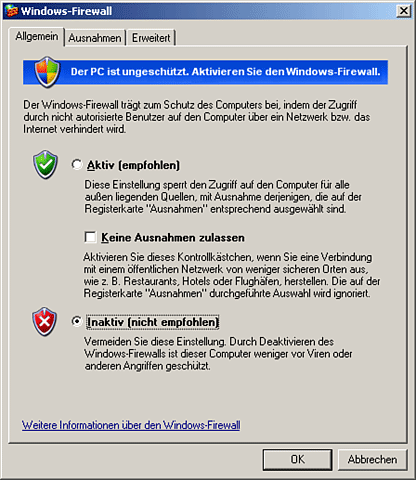
Windows XP: Firewall settings
Windows Firewall configure
On the left in the Firewall settings, you will see various configuration options.
- Click on the first point, you can select which services to allow and which not.
- On the second and third point can be a Firewall, among other things, on and off.
- On the "Advanced settings" you can make many other configurations. You should only do this if you are familiar with the topic, really.
- You have installed an additional Firewall on your Computer, you should turn off the Windows Firewall in the settings. You use two Firewalls, there may be problems with both services, so that your System can be unsafe.
A free Alternative to Windows Firewall with Antivirus is ZoneAlarm.





