
What is Malware?
Malware is a collective term for programs, which have been inflicting developed users damage. There are numerous types of Malware for example, viruses, Trojans, Rootkits or Spyware. All Work differently and have different tasks. A goal they have in common: to harm you.
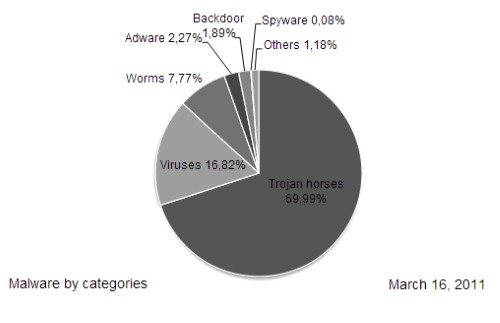
The distribution of Malware
How do you catch Malware?
- Malware can practically lurking everywhere - whether in the network while Browsing, when you Open a download, or an E-Mail attachment or connection of an USB-stick. Rarely, you will see that your PC was infected - unless your Anti-virus Software has averted the danger.
- Even if everywhere is a threat, you must not pull the network cable and the Surfing set. With the necessary Software, and a critical look at websites, Downloads and E-Mails, you need not to Worry.
How can I protect against Malware?
- Anti-virus Software: The A and O in the protection against viruses is an Anti-virus program that is also always Updates. So you are protected against the latest viruses. Good and free Software from Avira, Avast, AVG, Comodo and BitDefender.
- Firewall: The Firewall is enabled on Windows by default. It controls all incoming and outgoing Connections, and blocks them in case of abnormalities.
- Updates: keep your System and your applications stay safe, you should always use the latest Updates for Windows installed and only the latest versions of your programs.
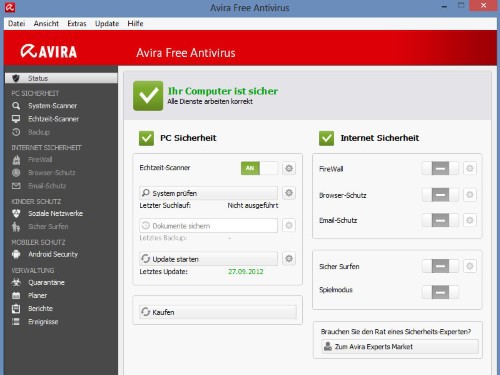
Avira AntiVir 2014
What types of Malware are there?
- Virus: A Virus consists of only one file that contains a malicious Code. The removed the Virus in a program that makes it mostly unusable, and trying to subsequently spread further.
- Trojans: a Trojan, also referred to as a Trojan horse, because the user installed a supposedly useful program, from which, however, then a threat is on the rise. So are usually injected other types of Malware.
- Adware: The Adware is the most harmless Form of the virus, since it causes your System to no real damage. They are most often nests in the Browser as a Toolbar or Add-on and tried to affect display advertising and your browsing behavior.
- Spyware: Spyware collects sensitive data that you store on your Computer or in Online Banking to enter. Then, the information will be sent to the Creator of the Spyware.
- Worm: A worm is similar to a Virus, affecting primarily, but not programs. Worms have more to do with the infestation of storage media such as USB Sticks and external hard drives.
- Rootkit: A Rootkit usually arrives via other Malware such as a Trojan on the PC and allows the Creator access to certain parts of your system.
- Backdoor: These "back doors" are introduced by other Malware, and allow the Creator also permanent access to your System.
- Exploit: An Exploit exploits targeted vulnerabilities in the System or in programs and can even control the whole PC.
- Keylogger: you document every keystroke on your keyboard. Enter, for example, with Online Banking, your account number and your PIN, it sends the Keylogger data to its Creator.
- Ransomware: This type of Malware locks by means of a Software parts of your system, and calls for a quasi-ransom for the release.
- Rogueware, also Scareware is Software that pretends to be, for example, as a virus Scanner. After the alleged discovery of several viruses, the program requires the purchase of the full version to remove the fictitious threats.
Exactly how a Virus works, we will explain in this practical tip.





