External hard drive: error 0x80071ac3 fix
- Simultaneously press the keys [Windows] and [E], so that the Explorer opens.
- Go to "This PC" and browse to the hard drive or the USB Stick.
- Click on the external Hardware with the right mouse button and select "properties".
- You can switch to the tab "Tools" and click on the Button "check Now".
- You activate all of the available options and start the process.
- Depending on the size and speed of the hard drive, the process can take several minutes.
Windows: disk error check
Error 0x80071ac3: hard drive format
The external Hardware can't be fixed, you need to format the device completely. To do this, copy all the files from the hard disk / USB-Stick on Computer or other media.
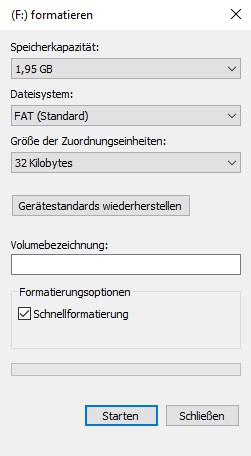
- You re-open the Explorer and click with the right mouse button on the hard drive.
- Now select the point "Format", a small window opens.
- Click on the Button "restore Device defaults" and click "Start"
- Then confirm with "Yes", the disk is formatted and the error is eliminated.
Formatting error 0x80071ac3
Should the Problem persist, we will show you in the next practice tip, such as a broken USB Stick repair.