
Skin in VLC Media Player change
First of all, you need a suitable Skin. Thus the design will not search for a long time, we have the best in our VLC Media Player skin pack combined.
- Download the .vlt file for the Skins down, you want to use. In our Skin Pack all are .vlt files in an archive Packed. In our gallery you can already take a picture of the Themes make.
- Open the VLC Media Player and select the "tools" menu the entry "settings".
- You activate the Button "use user-defined Style" and search via "Select" the desired Theme from your hard drive.
- At the bottom, click "Save" and restart your VLC Player finally, new.
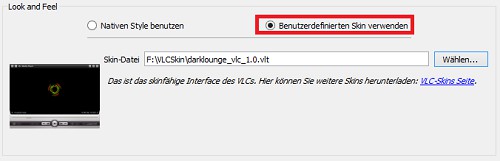
VLC Media Player Skin change
This practice tip is related to the VLC Media Player 2.1.3. For an even better Film experience you can use the VLC Player directly in the full-screen start.





