Own Theme for Firefox create
Your own Firefox Theme, you can submit online at Mozilla:
- To do this, create an image file for the title bar. This is the bar in which the Tabs are to see. The image file should be 3000 x 200 pixels in size, in order to perfectly in Firefox fit.
- You can also create an image file for the footer. Here are the required dimensions are 3000 x 100 pixels. Although since Firefox Version 29, no footer for the Theme, you need the graphics, however, at the Moment still. Here you can use but just a white image file in the appropriate size
- Open your Browser and visit the Theme page from Mozilla.
- Here you choose a name, a category and keywords for your Design. So other Firefox users, you can find your Theme easier.
- Below, you decide how other users of your Design continue to use.
- After you have uploaded your images, and the terms and conditions agreed to, you can submit via the Button "Theme submit" your Design.
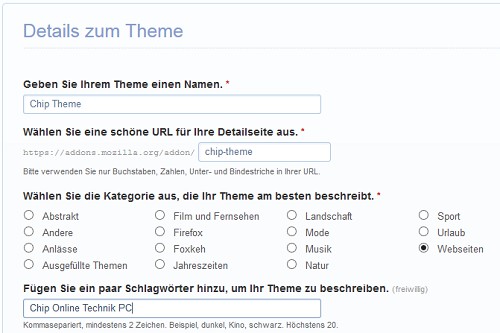
Firefox-Design submit
With the Personas add-on the own Firefox make
It is even easier using the free Addon "Personas". This is there in our download area and additionally offers the advantage that your Theme will not upload.
- Download Personas shut down and restart Mozilla Firefox afterwards.
- There is a new Icon bar appears in your title. Click on it and select the entry "settings". In the Dialog put a check in the "Enable Custom Personas" and then click "OK".
- Re-select the Icon and then choose the entry "Persona customize" and "edit".
- Here you can select the appropriate graphics for the title and footer are described and the Design. The data will remain on your Computer and are not uploaded. Here you can in the 29. Firefox-Version the graphic for the footer omit, however, confidently.
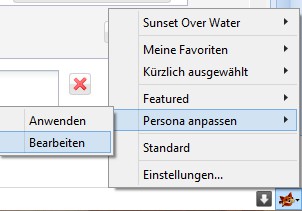
Personas Themes to use
To make your Firefox even more beautiful you can make your own Icons for bookmarks creating.