
iMovie: background music by Drag-and-Drop to add
In iMovie , you can easily make your own movies with a suitable background music to paint: drag the desired track easily by Drag and Drop in your project...
- Open the iMovie, the iMovie project in which you want to add music.
- Then, in the Finder, locate the music file to your movie.
- You drag the file with Drag-and-Drop it into iMovie and place them in the gray area after the last Clip in your project.
- Your background music is added to the beginning of your movie, and with a green Block in the project window, as shown.
- Your Film should be a project for longer than the music, added a title, you can add Drag-and-Drop to other tracks by repeating steps 1 to 3.

Insert background music.
The background music in iMovie, to adjust
- To change the Start - and endpoint of the background music, click on the small Gear at the front end of the inserted piece of music, and select from the Drop-Down menu to trim the entry "Clip".
- In the event window, you can now move the Start and end of your tune until you are satisfied with the result.
- Finally, click the top right of the event window, click "Finish".
- Now it says invite friends and Popcorn provide.
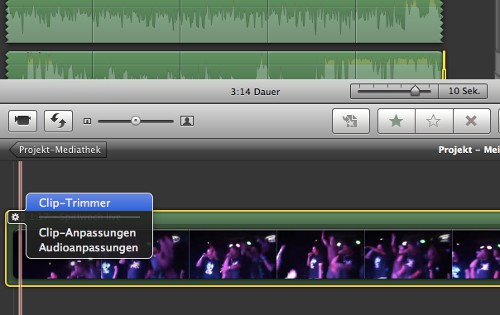
Background music, trimming.
How to get your movies in iMovie with amazing Slow - and Fast-Motion effects to spice it up, you will learn in this practical tip.




