Fast - and Slow-Motion in iMovie
You want to game, your dream-score from the last football with the team running in slow motion to enjoy, or a recording of the city centre at Rush Hour time lapse again? In iMovie, there are just a few clicks, to you fascinate your audience with impressive Fast - and Slow-Motion effects:
- Open iMovie and create a new event by clicking in the menu "file" on the relevant entry.
- Add the event on "Import" in the "file" menu, a Video, or import a movie from a camera via the menu item "import From camera".
- In the select event window from section the desired Video with the yellow marker and drag it via Drag&Drop in your project window.
- Click twice in the project window, click the Thumbnail of your Videos, to open the information window.
- Drag the speed Slider for Slow-Motion effect to the left in the direction of the little turtle Icon, or for Fast-Motion to the right in the direction of the rabbit Symbol. Then, confirm with a click on "Finish".
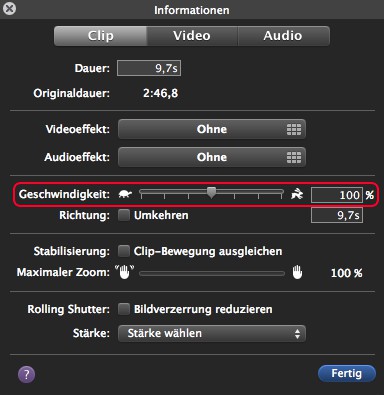
iMovie: speed may vary
How to make Videos on Windows 8.1 edit, we will show you in this practical tip.