
Word-pictures can't be moved - location change:
If you take a picture in a Word document to insert, it will, by default, a row is inserted, and is not free to move. With the following settings, you can change the but and free, in document order:
- Click on the image in your Word document.
- Select the tab "Format" and "picture tools".
- Under the Option "Position" select under "With text wrapping" any Position, for example, "top left".
- Your image is arranged at the corresponding position, but now free to move in the document to a new place.
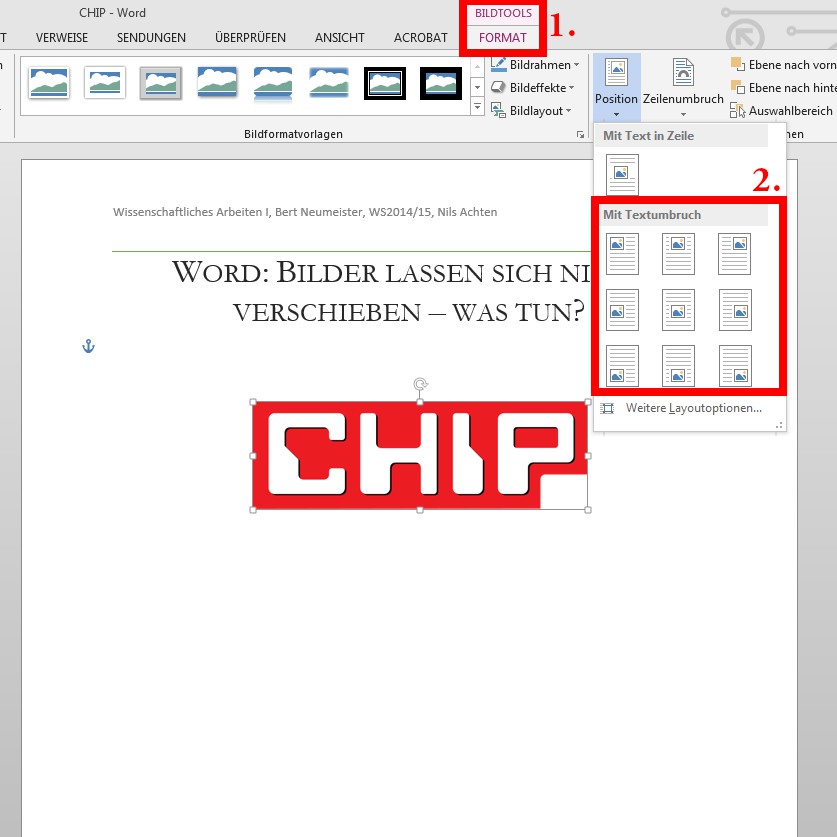
Word: images-free move
You now have your image at any point in the document, then you can now set the Text to the image flow.





