
The you can do in Word if the bookmark is not defined
Word gives you the error "bookmark not defined", have you removed probably place a text or edited, which was anchored with the text brand. To solve the Problem:
- This error often occurs in connection with the contents of the document.
- Try to update the list by clicking with the right mouse button and select the "directory update" in the select.
- You can also try the Text by Pressing the key combination [CTRL] + Z to restore after the error was displayed.
- Alternatively, it can also help if you turn to the table of contents and the erroneous Text in the static text.
- To do this, select the Text or the directory, and press the key combination [CTRL] + [SHIFT] + [F9].
- To be able to incorrect text brands fast track, you should make it visible. How to do this, we will show you below.

Word: bookmark not defined
Word: text brands to make visible and track
- Click Word on the top left on "file" and select "options".
- On the left, select the Option "Advanced", and check all the other options.
- You can now scroll a bit down until you reach the section "show document content".
- You put the check in the "text display" and save with "OK".
- Incorrect text labels are shown with a square bracket ([).
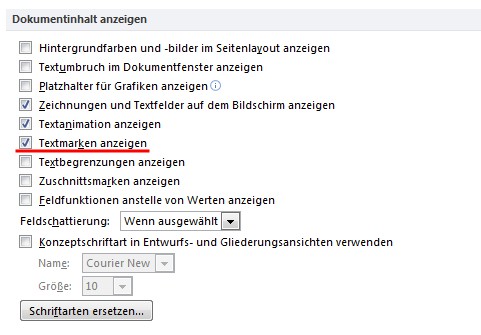
Word: bookmark, make it visible
This guide is based on Office 2013 on Windows 7. In the next practical tip learn, what you can do when the spell checker in Word does not work.





