
Word: Certain words count
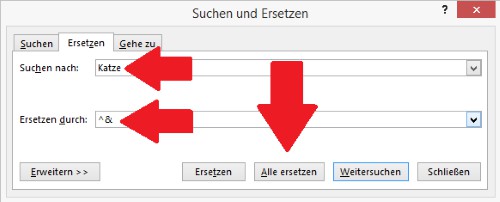
A function for Counting individual words, Word is not on Board, but you can apply a little Trick. With the "Replace" function you can replace the sense of the word free by itself. Word shows you, how many of these words were in the document and replaced.
- You can switch to the tab "Start" and click under the category "edit" on the Button "Replace".
- Type in the line "Find what" is the desired word, as well as in the line "Replace with" command "^&".
- Now click on the Button "replace All", you will see the number of searched words.
Word: Certain words count
In the next practical tip we show you how to create a Macro in Word to create.





