How do I customize the slide master in PowerPoint 2010?
On the slide master is the overall appearance of the presentation is built. Therefore, it is important to work in slide master view, while you are creating Layouts or edit the following:
- Select in the menu bar the "view" tab and then go to the group "master view" on the "slide master" (see image).
- In the thumbnail view you see the slide master because he is the largest film.
- Click the thumbnail to the left on the slide master, you see in the preview of the film with the allocated Standard Layouts that you can edit.
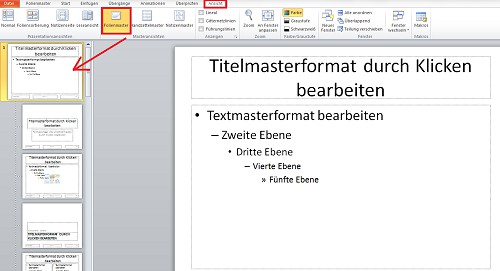
Slide master to adjust in PP
Tip: How to automatically create a slide table of contents create, we show you here.