To convert a Scan into Excel
First of all, the Scanning must be available as a PDF. You only have the JPEG file, you can use a Converter such as the free program JPEG to PDF. Then you will need the Adobe Reader.
- Start the program and see at the right edge of the window similar to the Screenshot.
- Click in the white box and select the PDF file you want to convert to an Excel file.
- Area, select the "Convert to" and then on "Microsoft Excel (*.xlsx)" from.
- You are done with your selection, click on "Convert". You can then call the Excel file.
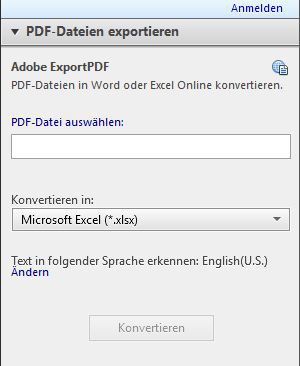
Scan convert in Excel
Like you forms, scan and fill, you will learn, in a further practical tip.