
Catchment size in Excel cells specifying
In Excel, you can determine in a few steps, the size of the feeder:
- Select the cell(s) whose feed you want to shrink
- You right click to open the context menu and select "cell format...". Alternatively, you can use the key combination [Ctrl] + [1].
- Click on the Tab "alignment".
- Under text alignment, "left (indent)".
- Enter in the adjacent "feeder"field is an integer between 1 (no feeder) and 15 (maximum feed).
- In order to change a right-aligned text, select text orientation "to the Right (indent)" and enter the desired value.
- Confirm with "OK".
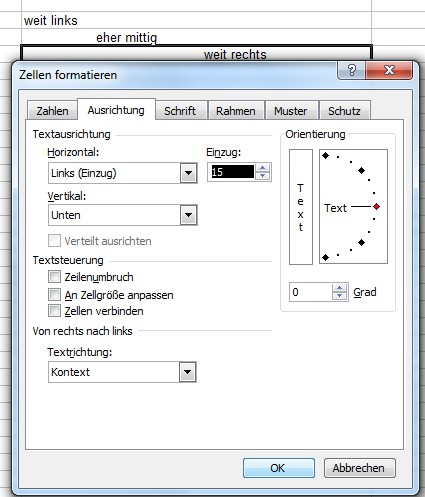
Excel: to enter set
In Excel, format cells, column width, fixing, vertical writing or the lines to fix in the further CHIP Online practical tips. This manual beziehtz to Office 2003, but it works in versions 2007 and 2010 are similar.





