
To disable on your Mac the Wi-Fi
You want to connect your MacBook or your iMac to the Internet via Ethernet and power save, you should disable the Wi-Fi.
- To do this, click in your status bar on the Wi-Fi icon between the Bluetooth and the volume Icon.
- Set to disable, check the "Wi-Fi". The connection is interrupted immediately.
- You can change these settings at any time by removing the check mark.
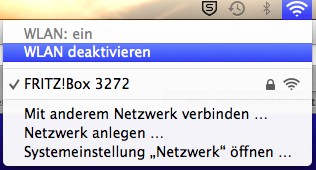
Mac OS X: how to disable Wi-Fi
In a further practical tip we will explain you how to proceed if your Wi-Fi on the MacBook no longer works. The manual applies to Mac OS X 10.9.3. The statement may differ for other versions may.





