
To delete a URL in the library
- You can either click on the "settings"Icon bar at the top right and then on "timeline" or directly in the menu on "chronicle". In Firefox 29.0, the menu bar, view, read here.
- Select in the menu "history show".
- On the left in the display of the library you can click on the timeline of a particular month. On the right side of the waveforms are displayed.
- Click with the right mouse button on a single URL, and in the context menu select "delete".
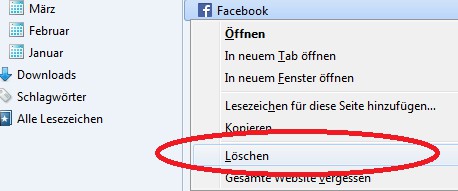
Single URL, delete
Read in a further practical tip for more about the new features in the latest Firefox 29.0.




