
In the IE addresses from the history folders, delete
In addition to the Option, the entire timeline to remove, individual Links manually delete:
- Click in IE the top right of the star icon.
- Then select the "history" tab.
- Now click on one of the window of time in which you want to edit the gradient. You will then be shown the folder of the websites you have visited.
- In the folders of the addresses of the pages you visited on the site. Click on the folder and then with the right mouse button on the URL that you want to delete.
- You can confirm this in the context menu "Delete".
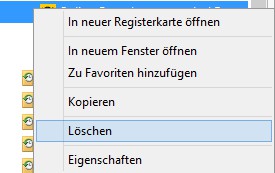
IE: Single URL to delete
Your surfing behaviour to better from prying eyes to protect, offers IE you the opportunity to the chronicle after each session to automatically remove.





