
Comcast.net Adware uninstall
- Open the control panel and click on "uninstall a program".
- Here, search for the entry "Comcast" and select it with the mouse.
- Click on the Button "Uninstall", Windows will remove the Software.
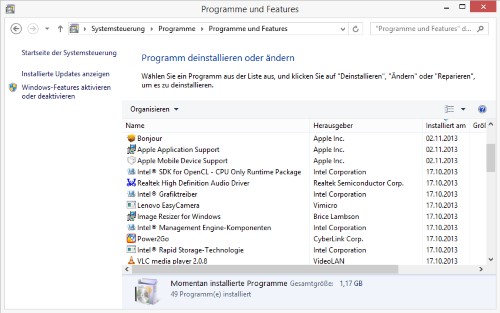
Comcast.net uninstall
Comcast.net completely remove Windows
- The free AdwCleaner requires no Installation. Download the Tool and run it.
- Close all Windows and click on the Button "Search".
- Then, remove all the finds and restart your Computer.
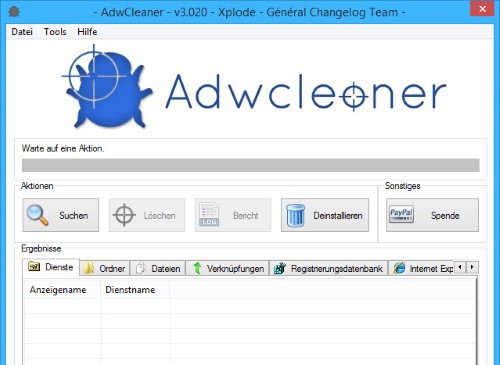
AdwCleaner: Comcast.net remove
Comcast.net the Browser, check links
- In most cases, Comcast.net was already removed successfully from your Computer. Nevertheless, some of the Remains may sometimes be present.
- Also in the links of the Browser, the home page can be manipulated. Therefore, you should also your Browser shortcuts clean up.
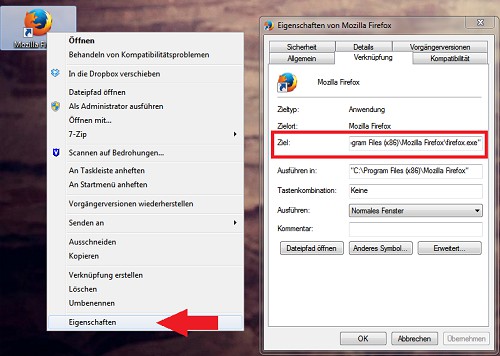
Browser-link check
In the next practical tip we show you how to in case a virus in Windows remove.




