
Indexing in Windows 7 disable
The indexing service runs under the Windows in the Background, and all Changes are documented in files. So you can browse your System faster. Do not use the search function in the start menu or Explorer, but eats up the process unnecessarily resources. Therefore, you should disable the Feature:
- Simultaneously press the keys "Windows" and "R", so that the Run Dialog opens.
- You type in there "services.msc" and confirm with a click on "OK".
- You are looking pretty far down the list of services, after the entry "Windows Search".
- Double-click the entry to open the "properties".
- Go to the tab "General". You select under the category of "startup type" Option to "Disabled".
- Then confirm with "OK", not more used the service as of the next reboot.
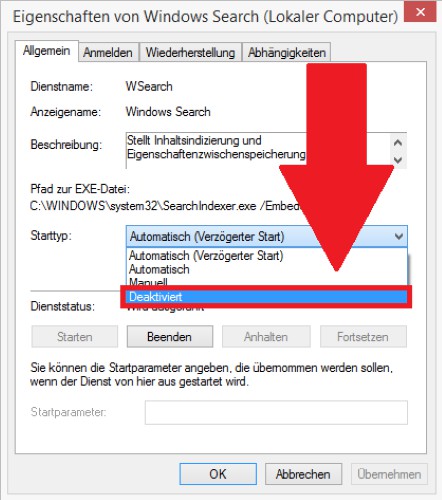
Windows 7: indexing off
Even more out of Windows 7 to get, you can also create your own keyboard shortcuts.




