
Instructions: Windows 10 without CD restore
Just in case of serious errors should you Windows 10 complete re-install. Your PC will be set back to factory settings and all data will be deleted. If necessary, you can keep the files.
- Open the Start menu and select the "settings" via the Gear icon.
- Go to the category of "recovery" and click in "This PC" on the Button "get started".
- Here you can decide whether you want to install only Windows and your personal data and settings, or all of the data you want to completely remove it.
- The subsequent process may take several minutes. Do not use your Computer during this time.
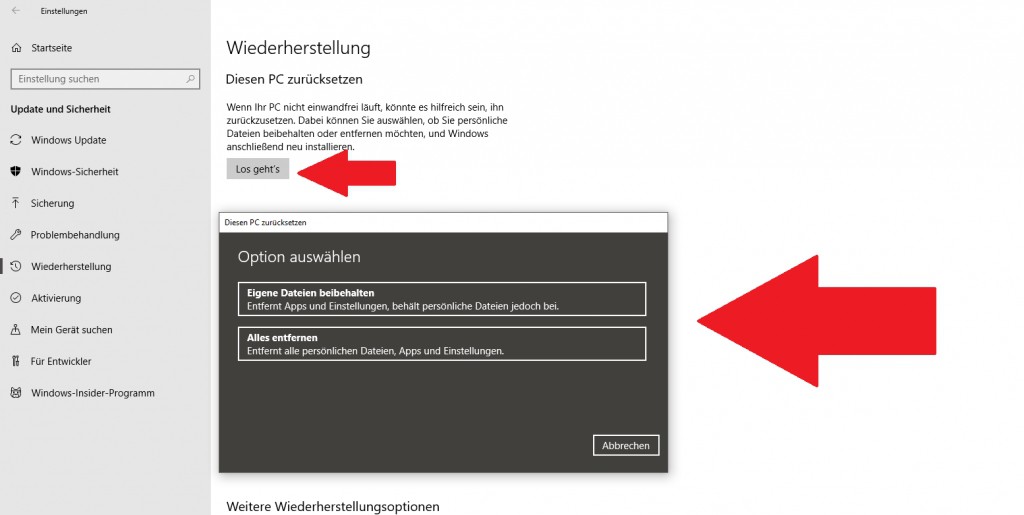
Windows 10 reset
Windows 10: system restore start
You don't want to install Windows from scratch, but the Computer only to an earlier time, continued, more help you the system restore:
- Open the Start menu and select the control panel from.
- Under the category "System and security" and "safety and maintenance" can be found in the bottom right of the "restore".
- Select the Option to "open system restore" and wait a short Moment.
- You choose one of the displayed points and you start the process.
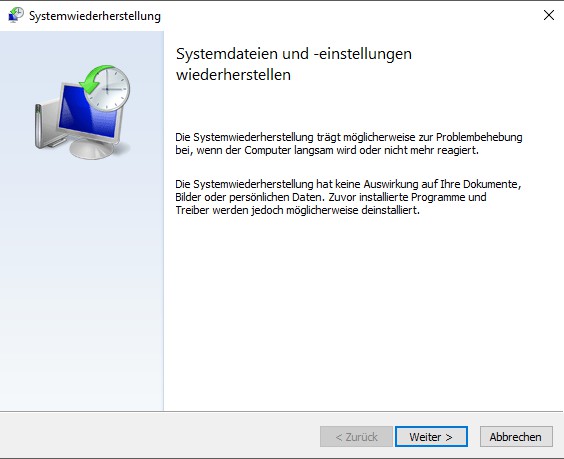
Windows 10 restore
In the next practical tip we show you how to Windows 10 without logging in to start.





