
CopyTrans Manager - copy music to your iPhone
Add music, works by Drag-and-Drop. Install and open CopyTrans Manager and connect your iPhone to the Computer.
- You select all the desired title and drag it with the mouse on the "iPhone".
- Similarly, you can also copy Videos, audio books and pictures to your iPhone.
- Alternatively, you can select the files or folders via the "Add" Button.

Files on the iPhone copy
CopyTrans Manager files from iPhone remove
Just as easily you can delete music, Videos, or other files from your iPhone.
- Select the files with the mouse and click on "Delete" in the top bar.
- To select multiple files, hold down the [CTRL] key pressed and click on the title with the mouse individually.
CopyTrans Manager - create playlists
You can create the playlists on your iPhone.
- Left click in the column "playlists" on the little blue Plus to create a list.
- Select the title that you want to add to the list, and then drag with the mouse to the new list.
- To remove a title from the list, select it and click on "Delete".
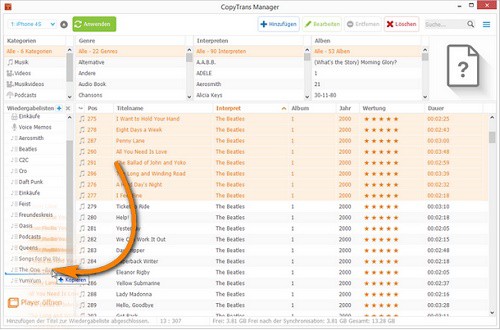
CopyTrans: Playlists
CopyTrans Manager - ID-edit Tags
If your music is not sorted properly, you can edit the information of songs and albums.
- Select the relevant title and click on "edit".
- Now enter the correct information and confirm with "Apply".
CopyTrans Manager - Changes to the iPhone store
Before you disconnect your phone from the Computer, you need to save the Changes. There are two possibilities.
- Click in the upper pane, click the "Apply" button when you are finished. As a result, all Changes will be saved.
- To save automatically after every Change, you can activate this Option in tab "settings".
As to your iPhone storage space, we will show you in the next tip.





