
Several search PDF with Adobe Reader
With the CHIP Online free available Adobe Reader and Adobe Acrobat (as Demao on-CHIP Online available), you can easily create multiple PDF files by keyword browse:
- Press the key combination [Ctrl] + [Shift] + [F]. Now the search form is displayed.
- Select "All PDF documents in"
- You can now select either (a) your own documents or a drive, for example, your E-Book Reader, ...
- ...or click the "browse for folder..." to select the folder that contains your PDF-files.
- Once you have selected a folder, appears this in the area of (b), and can henceforth be faster called
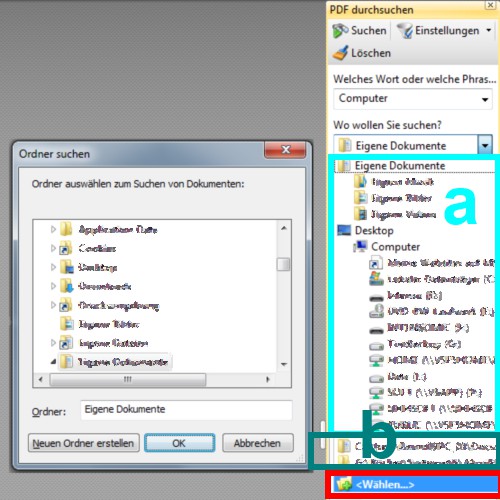
Many search PDF with Acrobat
Multiple PDFs search in PDF-XChange Viewer
In the Freeware PDF-XChange Viewer and Foxit Reader is to Search multiple PDF documents a bit easier:
- You can also press the key combination [Ctrl] + [Shift] + [F] to the search form view.
- Now mark, either in the area of (a) your own documents or a drive...
- ...or you can click "" to browse to a different path.
- Here, too, are already displayed in the searched folders, and drives in the area (b).
Search with PDF-XChange Viewer
In further articles we will show you how you can in Adobe Reader, individual chapters or comments in print, and what are the differences between Foxit Reader and Adobe Reader are.





