
MeinVZ - Account delete
By the deletion of the account all data such as messages, pictures, and Videos will be deleted. You want to delete pictures of other people, on which they are mapped or marked, you must report this before. The works on the "Report"function next to the pictures. To delete your Account permanently, follow these steps:
- Open the website and when I try and log in if necessary.
- Then select on the left menu, the category "My Account".
- Scroll to the bottom and click on the Button "delete My Account".
- Confirm twice with "Continue", enter your password and click on the Button "Account delete now".
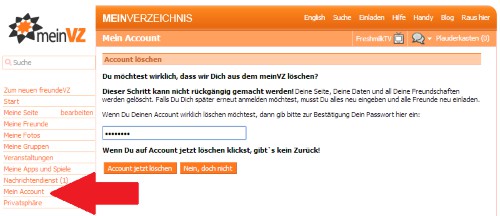
MeinVZ: delete Account
MeinVZ-Account by e-Mail or Postal cancel
- Alternatively, you can give your cancellation by E-Mail. Just send a Mail with the request of cancellation to abmeldung@meinvz.net.
- You can send the logout alternatively by Post to meinVZ. To give you in Writing also used e-Mail address. The address is: pool works (Germany) Ltd, Saarbrücker Str. 38, 10405 Berlin
SchülerVZ was already closed. Why and what to do with your data is, we can tell you here.





