
To turn off the spell checker in Word
- First, open Word.
- Click on the upper left edge of the image on the Button with the "Word icon" and then right below on the "Word options".
- Now a new window opens and you are in the "Word options". Now click in the left column on the "document review" - behind this cryptic term Microsoft hides the settings for automatic spell checking.
- This area is divided into four sub-groups - relevant to you is "When Correcting spelling and grammar in Word".
- Here you need to remove the check mark in the following five points:
- "Check spelling as you type", "Context-sensitive spelling use", "grammar errors as you type check", "check grammar with spelling" and "show readability statistics" (see image).
- Now you need to confirm the new settings for the spelling check with "OK".
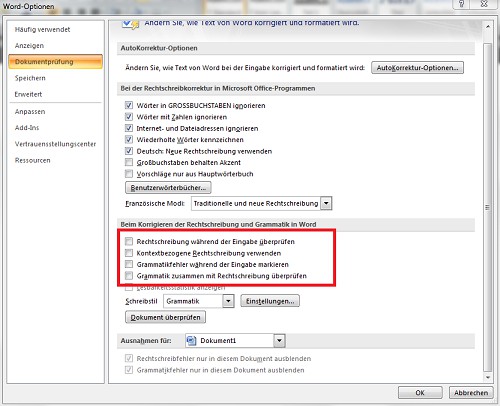
Word: Spell Check
This practice tip works also with newer versions of Word. How to you double space in Word remove can, we show you in this practical tip.





