
Compare documents with Microsoft Word
- Click at the top of the ribbon of Word "Check".
- Now click Compare on the "following" tab and then click "Compare...".
- Now, a Popup window called "compare documents". In the left box, look for the original document. To the right you choose the older or newer Version of your document.
- Then click "OK". It is a new Word document, in which the two selected documents to compare opens.
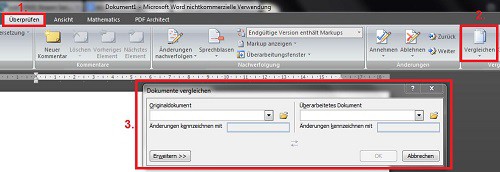
Compare documents with a Word
The Option "compare documents" is only from Word 2007, which has been used in this practical tip.





