Excel spreadsheet sort by date - in three steps
- You select first in your Excel document values of all date.
- Then click with the right mouse button on the marker and select in the new menu "sort".
- Finally, you can choose either the ascending or descending sort order.
Excel: sort by date
Data is not sorted correctly - what to do?
If you data is not sorted within a year correctly, then you should check the Format of the respective cells. Make sure that the correct date format is set. In this case, proceed as follows.
- You to mark in such a case, the respective cell.
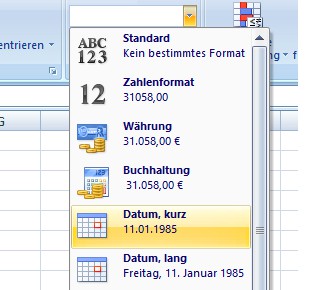
- Under "Start" in the menu bar you will find in the field "number" the Format of the cell. Here you should select depending on the Format, "short date" or "long date".
- Alternatively, click with the right mouse button on the cell and choose "format cell".
- Here on the left, select the category "date" and select the appropriate date type.
- Now the sort should work fine.
Date will sort properly
Read how you can in Excel, set a Filter. This practice tip has been tested with Excel 2007.