
Your own function in Excel to create
- They open in the first step of Excel, if not already done.
- Click in the menu "Extra" - > "macros" and open the "Visual Basic Editor".
- Then select in the menu bar "Insert" > "module".
- Enter your function. Don't forget, at the beginning of "Public Function *function Name*" and at the end of "End Function" add. You should use the function name no umlauts or spaces.
- Now click in the toolbar, click the floppy disk icon, the function to save it.
- Now you can access it from the formula Manager on the function. Note, however, that the function will be stored in the workbook. You want to use this in another project, you must copy them first.
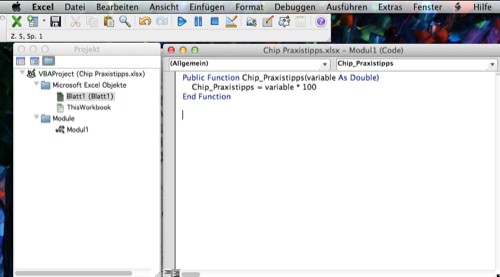
Function in Excel to create
This practical tip is based on Excel 2011. Read also, how to make a Excel table as an image file to save.





