
Excel spreadsheet for the matrix formula to create
If you are in Excel , for example, the sales of multiple products calculate the different prices and different often were sold out, well worth the use of a matrix formula. In our example, we want to calculate the turnover of a flower shop.
- First create a table in which you have to pay the prices and sales for the different products hold. The "price" and "number"columns of the matrices. (In our example, C3:C5, D3:D5)
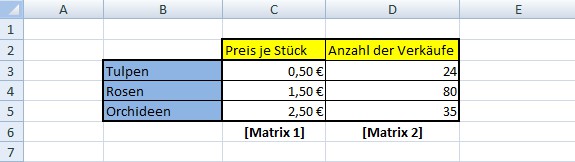
Array formula to prepare in Excel
The matrix formula set up in Excel
In addition to the table, you need to set up the matrix formula.
- You can set up the array formula in any cell. You write the following formula:
- =SUM(C3:C5, D3:D5)
- You terminate the input with the key combination [Ctrl] + [Shift] + [Enter], because the only way Excel will recognize the array formula.

An array formula in Excel set up
You have several array formulas in a table, we will show you how to use the individual cells in Excel compare can.





