Home Blog Archive MS Office Bcc in Outlook to make it visible

Bcc in Outlook to make it visible

  • Feb 26, 2026
  • 627
  • 0

In Outlook the field "Carbon Copy"(Cc) for the E-Mails immediately visible, "Bcc", so "Blind Carbon Copy", is less known and cannot be found in Outlook is the same. The difference with the Cc is that the recipient cannot see the addresses of the Bcc. As you leave this function in Outlook, you will learn in this practical tip.

Bcc field in Outlook messages

  1. You create a new E-Mail message in Outlook.
  2. Click in the navigation bar at the top of the "options". Select the Button, "Bcc" and the corresponding Text field is displayed under the sender, recipient and Cc.
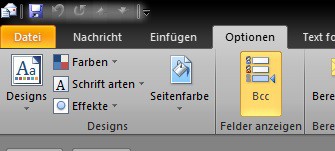
Bcc in Microsoft Outlook
This manual refers to Microsoft Office 2010 in Windows 8.

YOU MAY ALSO LIKE

0 COMMENTS

LEAVE A COMMENT

Human?
1 + 3 =


