
Instagram profile at least partially conceal
Post your posts private, you can individually set whether or not you should see a new subscriber:
- Open the Instagram App and click on the bottom right on the map icon to your profile to open.
- At the top, choose "edit your profile".
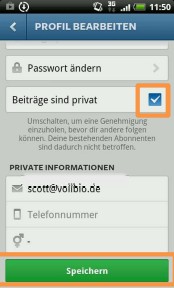
- You put the check in the "posts are private" (Android) or the "Posts are private" (iOS).
- You can confirm this by clicking "Yes, I'm sure of it" (Android) or "Yes, I’m sure" (iOS). On Android, you need to click in addition on "Save". Make sure that the hook is under the "posts are private" was also set actually.
- Users who are not subscribed or to which you have access denied, can't see your photos then.
Instagram profile hide
In a further practical tip we will show you other important privacy settings for Instagram.





