HTML - the language for the structure and content
You create a Homepage that will bring you the content via HTML on your page. Texts, images, and structures, such as a table, tie you to HTML-files. This HTML has a number of roles.
- In an HTML file, you first declare the document type. This specifies which Version of HTML you are using.
- In the following the head section - the Head - to specify technical Details, for example, which CSS file it is coupled. Also the title that appears in the Browser Tab, you specify here.
- The HTML Body includes the content of a website. All texts and images, which you upload to your Homepage, landing here. They structure the text in paragraphs and Headings of the various hierarchies.
- A Headliner with the highest priority format, for example, with the command to the Heading of the first order. Other Headings to structure the commands
,
, etc., These commands are directly related to the HTML-Header defined in CSS file.
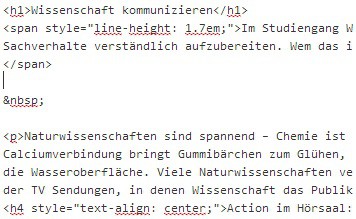
Excerpt from HTML
CSS shape and color of your Homepage
Unlike HTML, the CSS file does not bring any dynamic content on your Website. With it, you specify how a Browser is text and images. Also, you design with CSS, the basic structure of your Homepage.
- Margins, backgrounds, and feet - or head-rows are created in a Cascading Style Sheet. For a Blog you share, for example, the page in two columns; one for posts and one for Links, Widgets, or fixed news.
- In addition, you can define the CSS file fixed text formatting. With you in a HTML-file Headers and
defined, they remain unchanged. In the CSS, enter these commands now a the Form, for example, you can set the font size to 16 and for
14.
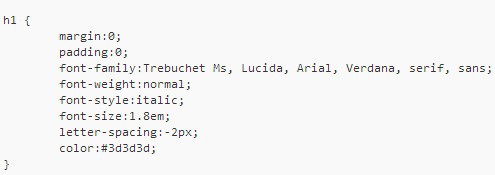
h1 Heading
You can create a home page without the CSS files. The advantage of CSS is that you can change with only a Change in the Design of your entire home. You want to zoom in on the Headlines, it is sufficient to change the Format. Otherwise, you would have to search in every HTML file of your website, the Headings, and change.