Step 1: Classic Google Maps-open Version
In the new Maps Version of Google, there is the fuel cost function is not more. Therefore, you have to switch to the classic Google Maps.
- To temporarily return to open Google Maps, click the bottom-right of the question mark and select "Return to classic Google Maps".
- If you want to permanently work with the classic Version, you acknowledge the notification at the top with "Yes".
- Alternatively, you can also use this Link to follow.

Google Maps: Classic View
Step 2: fuel cost calculated in Maps
Now you can calculate the fuel cost for your Route:
- Click in the left pane, click "calculate Route" and enter your Start and destination.
- "Target" can add, if necessary, one or several intermediate objectives.
- Click on "calculate Route" and select one of the proposed routes.
- You can now scroll in the left pane to the bottom. Here you can see the approximate gasoline costs.
- With a click of the petrol cost display you can set the type of vehicle, type of fuel and price of gasoline and their results, so Refine.
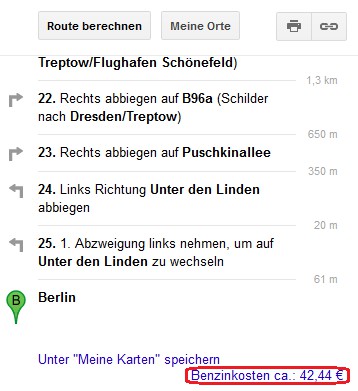
Petrol cost on Google Maps
In the next practical tip we show you how Google Maps even more effective use can.