Chatroulette delete Account
Currently, the developers of Chatroulette have installed does not have a function, you can delete your account completely. Therefore, you need to contact Support:
- Open the web page of Chatroulette and log in if necessary.
- Click on the Button "Support and contacts" will bring up a small window.
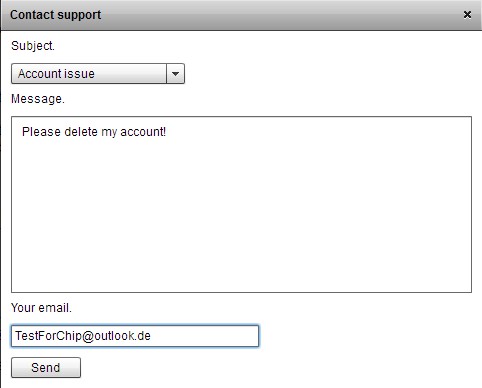
- Via the Button "Contact support", it takes you to a form.
- Select "Subject", select "Account issue" and enter as a "Message" just a short Text like "Please delete my account".
- You left in the last field of your E-Mail address with which you registered and click on the Button "Send".
- Whether and how quickly your request will be investigated, however, is unclear. In the Test, no feedback came after five days.
Chatroulette delete Account
Chatroulette Account clean up
You should be your request was not met, you can make your profile for the time being unrecognizable:
- Open the web page of Chatroulette and log in.
- Then click on the Button "Profiles and settings", you will be shown all of the available settings.
- Here, you can now remove all of the contained data. This includes pictures, as well as numerous personal information.
The three best Alternatives to Chatroulette , see the next tip.