Exclamation mark at the OneDrive icon means no Internet
The exclamation mark means that you connection is currently not connected to the Internet.
- Now insert data into the OneDrive memory of the device on which you are working, then the cloud service can make data synchronization. Therefore you are not able to access it from other devices on the new data (as long as the exclamation point to the OneDrive icon).
- To download the data in your OneDrive Cloud, you need an Internet connection.
- For the lack of Internet connection, it can have many causes: Perhaps, your Router and the Wi-Fi network is down, you may have disabled the Internet connection on your PC/Laptop, or there are problems with your Internet provider before.
- As soon as you are connected to the Internet, the bar disappears, the exclamation point to the OneDrive icon in your system tray.
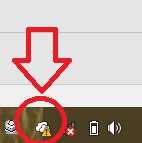
OneDrive icon with exclamation mark
Read to this purpose, as in WIndows 8 Wi-Fi enable. How to make a LAN connection enable, reveal we are in a different practical tip.