
Sound boxes: a USB Headset as a communication device
If you want to your Headset only for Skype, Teamspeak, or otherwise as a VoIP device to use, you can already make in the control panel for the correct settings:
- Start the control panel and open the "Sound"menu.
- In another window you see all your playback options.
- First, click on your boxes, and select the collection "set As default". Now, every Sound is played through your speakers.
- With a right click on your Headset, you can select the "set As default communication device".
- Your Headset is now selected automatically in the case of Communication programs such as Skype as your first choice. To listen still your friends through the headphones.
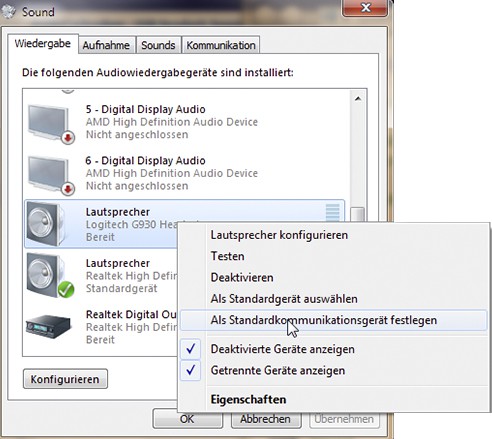
Headset Sound Settings
Software boxes-Sound: despite the Headset back
Many music or Chat programs, you can select your playback sources individually. To do this, you need to be described in the System settings only, as above, your speakers as the default playback device selected.
- Skype: Open the "actions" settings and go to the menu item "audio settings". Now you can select both your MIC, as well as their playback source.
- Teamspeak: Even in TS3 you can your settings be specific, and select: Open the "settings" options and go to "playback". As a playback device now select your Headset.
- MediaMonkey: If your music through your boxes, want to play, we recommend MediaMonkey. In the menu "options" under "select a Player" > "Output Plug-Ins" the plug-in "MediaMonkey DirectSound output". In the settings for this output Medium, you can set up your speakers as the playback device. In the control panel finally, select your Headset as the "default".
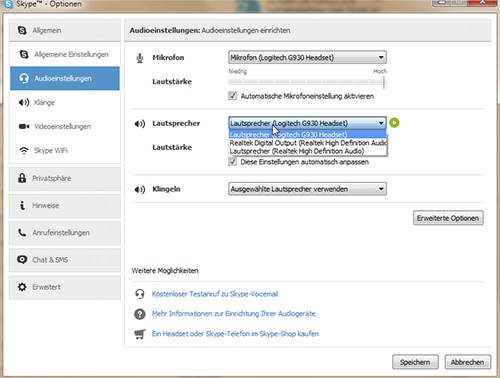
Skype: audio devices select
In spite of the boxes are still all about their Headset understanding, you should the volume of the headphones to increase.





