Wi-Fi Hotspot setup for Blackberry OS 7
From the OS Version 7.1, you can set up on your Blackberry Bold, Curve or Torch a Wi-Fi Hotspot. The Internet connection of the Smartphones you can share with up to five devices. The Tethering set up and activate, open the settings in your Blackberry.
- There you will find the entry "manage Connections". Select this.
- To activate the mobile Hotspot, put a check in the "Mobile Hotspot".
- To be able to the Hotspot, you need to configure this. Select a name and a password for your Connections. Confirm the entry and close the settings.
- An Icon in the status bar informs you on the active Hotspot.
Wi-Fi Hotspot setup on the Blackberry OS 10
Also, the latest operating system the Blackberry OS 10 with the Hotspot to repurpose the function of a mobile Router.
- To do this, open the "system settings".
- Under the menu item "network connections" find the entry "Mobile Hotspot".
- Confirm the safety instructions with "Next" and then follow the instructions.
- Set a Hotspot password. Devices that want to access to your wireless network, you must first enter this password.
- As a result, the Hotspot is activated. In the info screen you will now see the Status of the connection and associated Smartphones, Tablets or laptops. Up to eight devices can power your Blackberry at the same time with Internet.
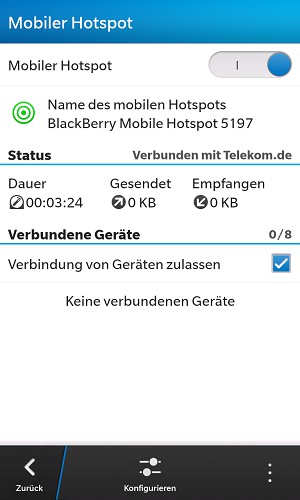
Info-Screen of the Wi-Fi Hotspots
The special case of Blackberry Bridge: BlackBerry Playbook Tablet pair Smartphone OS 5.0
You have a Blackberry Playbook and a Blackberry Smartphone, so you don't need a Wi-Fi Hotspot. You can connect your Tablet easily from the in-house "Bridge". Thus, you can not only via the Smartphone to the Internet, but also have access to contacts, calendar, BB Messenger and other data. Bridge runs opposite of the normal Hotspots, Bluetooth, and consumes less battery.
- First download the free application "Blackberry Bridge" on your Playbook and Smartphone.
- In the options on your playbook, select "Blackberry Bridge".
- You set up the connection with the wizard and press "Continue". It is a Barcode appears.
- In the App on your Smartphone, select "add New Tablet"
- You scan the Barcode on your Blackberry Playbook.
- With a click on "Continue" to connect the Tablet automatically with your Blackberry.
For more Blackberry Apps you can find here.