
So do you get a when your Computer high - and was shut down
- Click on the Home Button (formerly "Start") and type in "eventvwr". So you can open the "result display".
- Click in the left menu on the folder "Windows logs" and then click "System".
- Here you can find the System logs sorted by date and time (see image).
- The log with the event ID 6009 indicates when your Computer is started and the ID 6006, the date when your PC was shut down.
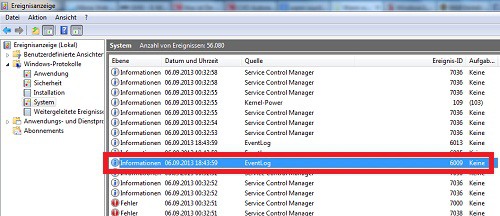
System Logs Windows
The best Tools for Computer Monitoring, we have you here assembled.





