
Cube World via Hamachi to play
Have you never had a own Server set up, you play Cube World best over Hamachi. In a further practical tip we will explain how to use a Hamachi Server for Cube World setup.

Network with Hamachi set up
Multiplayer Server by port forwarding set up
You can create your Server using a port forwarding in the Router. This variant is intended for advanced users who want to use any additional software.
- Start the file "Server.exe" from the installation directory. This is Cube World, by default, in the path "C:\Programme\Cube World\".
- Go to the configuration page of your router. Depending on the device different. Common addresses are "192.168.178.1", "speed port.ip" and "fritz.box".
- Now create a port forwarding for the Port "12345" via the TCP Protocol. In a further practical tip we will show you how to use the new Ports.
- Now copy your IP address and share this to your friends with. So, you can connect in Cube World with the Server.
- If you do not have a static IP, change your address every 24 hours. Either you betray your fellow players in case of need the new IP or set a static IP address is a.
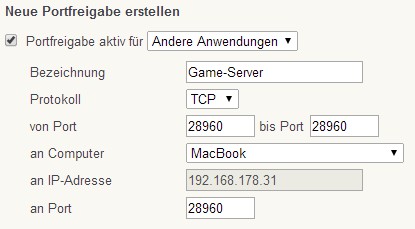
FritzBox: Possible Port Sharing
Cube World play on dedicated Server
A dedicated Server or a VPS is available to you, this is an optimal solution. For this purpose you will have to copy some files to the Server, to start it.
- On call, first of all, your own Server.
- You will have to copy the files "Server.exe", "msvcp110.dll", "msvcr110.dll and zlib1.dll" on your Server.
- Start the "Server.exe".
- Finally, you communicate to your players your IP address so that they can connect on Cube World.
Now you can properly get started and the different biomes of Cube World to explore.





