
Android 7.0: night mode turn on and use
In the night mode, the Display shows a reddish appears, by shades of blue are artificially reduced. The warm colour scheme is easy on the eyes in a dark environment is enormous. Why Google has the originally intended function shortly before the Release is deactivated again, it is not currently known. Although you can enable the Feature via the following way, errors are not excluded, however.
- To activate the night mode, you first drag twice, the status bar downwards. The notification window opens.
- Press and hold the Gear icon at the top of the edge for a few seconds, until it begins to rotate around its own axis.
- You will then receive the message that the "System UI Tuner" has been added to the settings.
- Drag the status bar down two times and tap the bottom right "edit".
- Below the lettering "To Add the tiles to draw" you will find the eyedropper icon in the night mode.
- Press and hold the icon and drag it to the top in the quick settings.
- Then, you can activate the night mode with a finger tip on the Pipette.
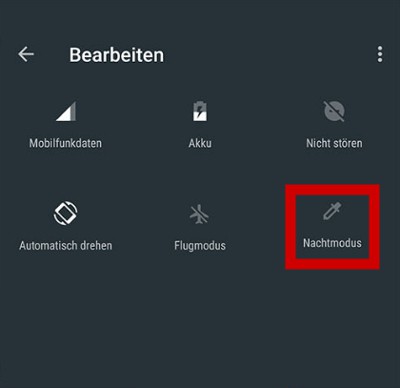
Android Nougat: Night Mode
Android Nougat: night mode setup perfectly
The color you don't like stitch or the Display in night mode is too dark, you can personalize the Feature.
- Hold the pipettes-tile in the notification is pressed the window until the settings App opens.
- You can then activate via the "Automatically allow" night mode automatically start. To do so, specify a desired time, in which the Feature should be active.
- Turn off further down the entry, "adjusting tint", if you don't want to have the tinge of red in night mode.
- Deactivate the Option "adjust brightness", to adjust the night mode, your Display brightness automatically.
Android 7.0: night mode setup
Although the night view mode has not officially made the final Android 7.0 Version, the Update is full of new features. All of the new Features of Android Nougat in a further article.





