Debug mode running Android 5.0, a USB connection, activate
Note: Leave the USB Debugging mode is only activated as long as you need it. Turn off the function again afterwards, since they can be used as a gateway for potential attacks.
- Se to go into the menu of your smartphone and open the "settings".
- Swipe down to the Option "About the phone".
- Tap several times on the entry "Build Number". After a bit of tap you have enabled the "developer mode".
- Go back one step in the "settings". There you will find the entry "developer options".
- If you check the Option "USB Debugging" and confirm the message with "OK".
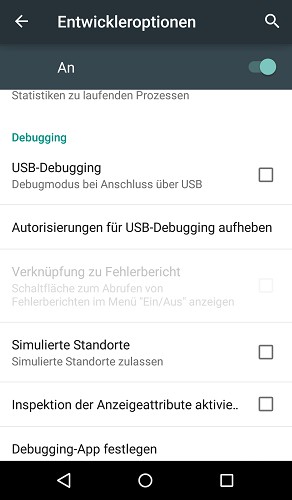
USB Debugging use
Did you know? Even more beautiful are Games on your Smartphone, if you have the Antialiasing feature under Android to activate. This guide refers to Android 5.0 with the Nexus 5.