
Program will not uninstall – this you can do under Windows
You can't uninstall a program from your PC, there is no reason to Despair. Below, we tell you how you the Problem on Windows can fix:
- Just try out a second Time to uninstall the affected program and wait for the Uninstaller opens.
- If this happens, you can try to install the affected Software again and overwrite the bad Installation.
- After the Uninstallation of the program should run without problems. Alternatively, you can use the Uninstaller from the program folder.
- It is also here to problems, you should use the latest Version of Windows Installer, download and install it.
- You can also try the PC using system restore to return to a previous point in time. In some cases, the Uninstall works after that.
- You can use these tips the program is still not removed, try it with the Revo Uninstaller to uninstall.
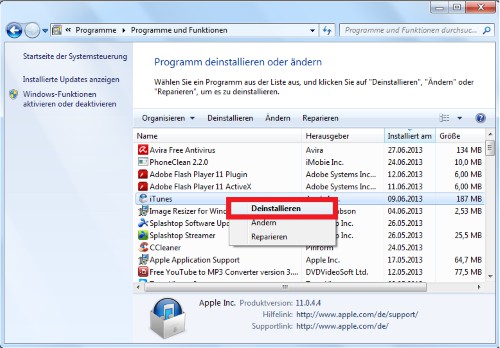
Windows: uninstall a program
Programs in Mac uninstall – what to do?
You can uninstall on Mac OS, no programs, we have the following tips for you:
- Here, too, a simple restart of the PC may, in some cases, quite a remedy.
- Make sure that you have the necessary access privileges to uninstall the desired program.
- Possibly the program is also protected. You right-click on a program file and remove the check in the "Protected". You must repeat this process for all files of the program.
- You can also try to delete the program with the Terminal. Start the Terminal and enter "sudo rm –rf". Before you confirm with [Enter] key, drag the desired program folder in the Terminal, so that the path after the command appears. You can then run [Enter] the command.
- Make sure that the program that you want to uninstall, does not contain any special characters in the name. This can lead to problems during Uninstallation.
- The program is still not removed, you can try it with AppCleaner to uninstall.

Mac: uninstall a program
For more info, as Windows programs are safe to uninstall, see the next tip.





