
LAN Party: setting up the network
- You connect all the computers to be used at the LAN-Party, via a network cable to a Switch.
- You open one of the computers connected to the system panel and select "network and Internet". Then click "network and sharing center".
- Select change on the right-hand edge of the menu item "change adapter settings" and click in the following window, right-click on your LAN connection.
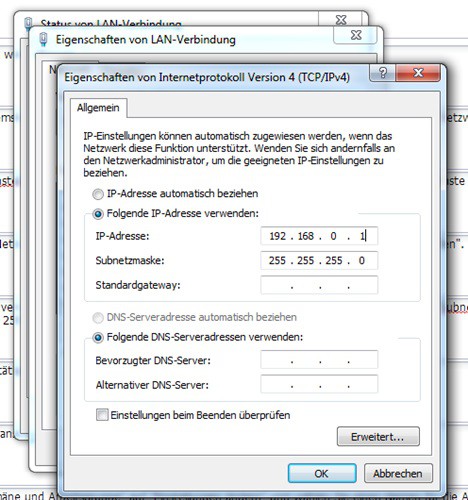
- Click on "properties" and then under "network" on the "Internet Protocol Version 4 (TCP/IPv4)". Now select again the "properties".
- In the next window click on "use the Following IP address" and enter in the field "IP-address" is the address of 192.168.0.1. By clicking on the "subnet mask" fills in the field automatically. This is not the case, enter 255.255.255.0.
- All other fields must not be filled in. Confirm with "OK" and navigate back to the control panel.
- Now select the "System and security" and then "System".
- Then, under "settings for computer name, domain, and workgroup settings" click "change settings" and choose a name for the workgroup, for example, "LAN-Party".
- Repeat steps 2-8 on all computers to be connected on a LAN-Party with each other. At any computer you have the IP address in step 5 in the fourth to pay any other number between 1 and 255 section choose. So you can give the second computer an address of 192.168.0.2, the third computer the address 192.168.0.3 and so on. The Name of the workgroup from step 8 must be identical on all PCs.
Network for LAN-Party set up
If you still have the right games for your LAN Party, do you find in the Download area of CHIP Online a great selection of free Multiplayer Games.





