
The idle state, determine when to Close the laptop
- Go to the control panel and select "System and security".
- Now click on the "power options".
- In the left View, select "Choose what closing the lid does".
- Now you can decide in the area of "power button and lid settings", whether you are operating in "battery, and/or "mains operation" the Laptop when you close in the resting state want to put.
- Finally, click on "save Changes".
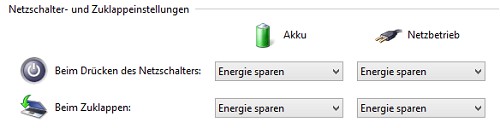
The rest state in case of collapse
You can your Laptop when you close on the energy saving setting. What is the difference between hibernate and power save is, we will explain in another practice tip.




