Folder in the home network
The easiest method is to unlock, the folder for your home network block:
- You can do this by going with a right-click on the desired folder, and then click the Option "share...". There you can select "HomeGroup (read/Write)". How to create a home network, create group, read here.
- Now all of them are within the home network group is entitled to remove files from the folder, add and edit. If you would like to restrict the access, choose "HomeGroup (read)".
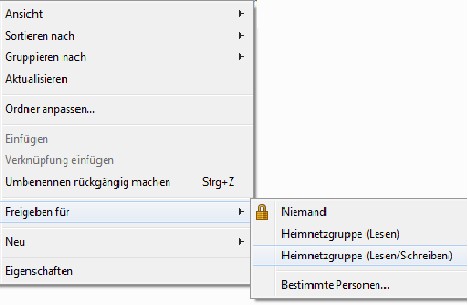
Drop-down menu to share
User-Specific Release
If you don't want to share the folder for the entire home network or any User of a network group, you can ask him only to specific users. To do this, proceed as described above. However, you can choose instead of sharing in the HomeGroup, the Option "Specific people...".
- Then, a separate window opens. Here you can add the selection menu for certain Users. Under the "privilege level" you can set the type of access and click on "share" to confirm.
- In the following window you click "Yes".
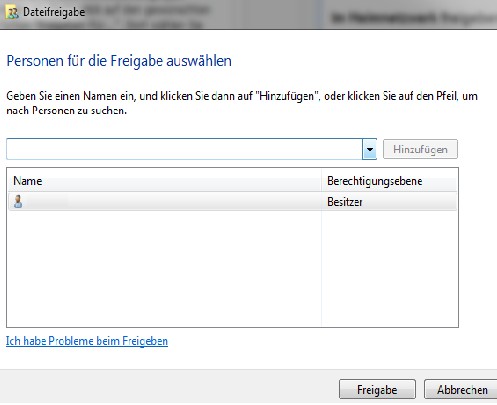
File sharing for certain Users
Password protected sharing folders
Depending on whether your network is on a private or, for example, a network in the office, you can add security options. So you can determine whether the shared user will need to enter when you access your folder with your user name and password or not.
- To do this go right-click on the folder and select the Option "properties" in the folder menu. There click on the tab "sharing".
- At the very bottom of network and sharing center (see image). Here you can make, both for private as well as public networks and all configurations. To select a password-protected access, scroll down under the private network-to-bottom, and set the dot to "password protected sharing turn on".
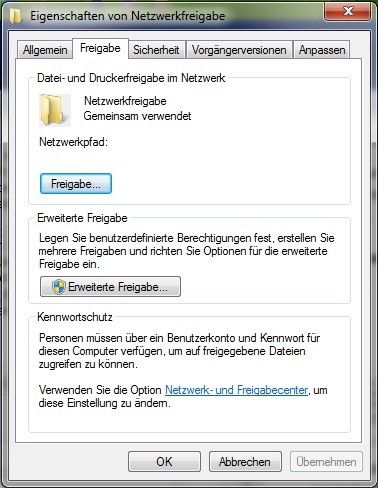
Sharing on the folder property menu
Practice tip applies to Windows 7. If you have your home network to a Multimedia-Center want to help you with this article about NAS storage.