
Forms paste in Photoshop: Different tools to choose from
- Open in Photoshop a picture, or create a new surface.
- Forms to insert, you must enable the tool box. It works through the menu bar. Click on "window" and put a check mark in "tools".
- Click the tools button tools with the right mouse on the rectangle tool.
- At this point you have the choice between different forms. Select the ellipse tool.
- On the "custom shape tool" you can create more other shapes. You can do this bar after selecting the tool at the top of the menu in the "Form" of one of the many forms to select.
- After you have decided on a shape, drag the shape in your image to the appropriate size.
- You can move the Form by selecting the tool "Move tool" box and the Form to the appropriate position.
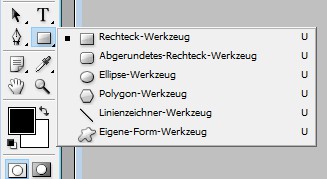
Photoshop: forms insert
Read also, how to you Photoshop in the circular.





